Roles and Permissions
1. Roles
A role functions as a bag of permissions for the user.
A role has 3 properties:
- a role name;
- a description;
- a list of permissions.
Check the Roles table in the Users page, for a list of the roles available in your trial.
Like the users management work-flow, roles may be created and edited if the user has the appropriate permission, by clicking the New Role option in the table and by clicking the Role Details represented by the eye button, respectively.
2. Permissions
Like the name suggests, a permission gives the user authority to view information or perform an action in the system, which would be otherwise blocked or hidden from the user.
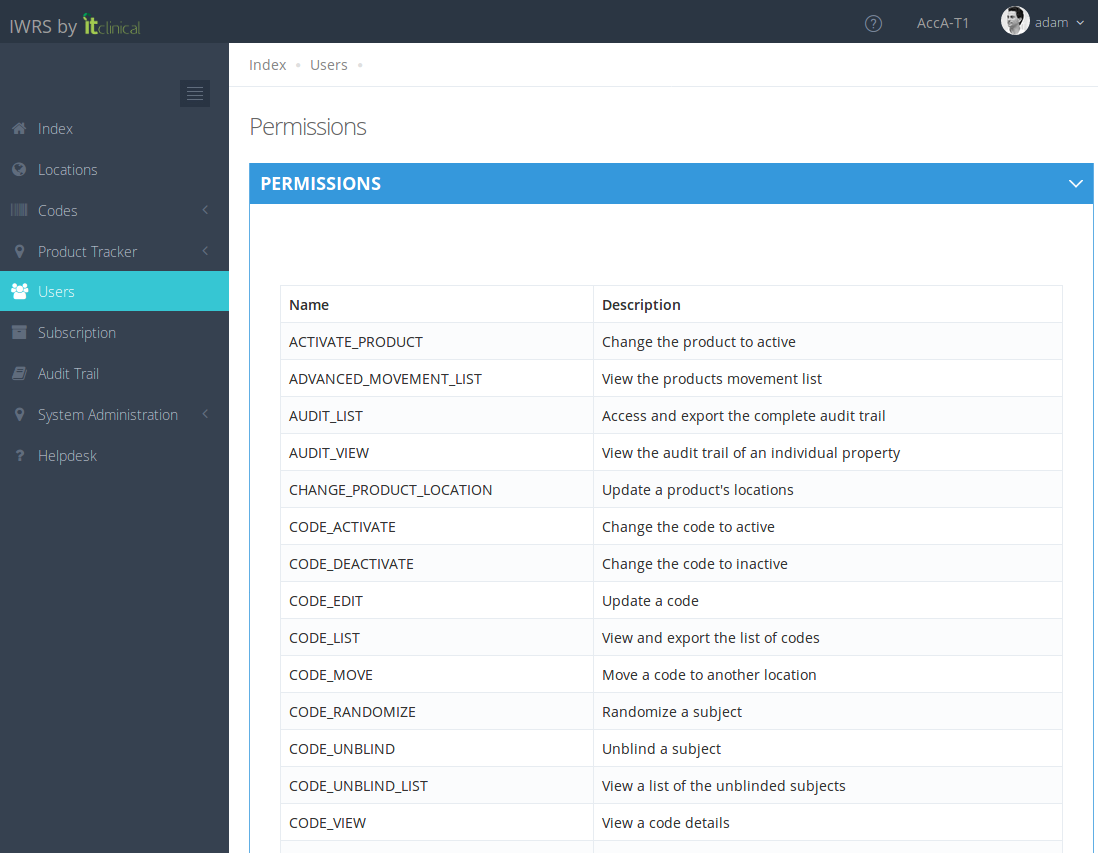
Check the Permission page, for a list of the permissions available in the trial. The user may access this page by pressing the Permissions button in the Users page.

Related Articles
How to create Users
Note: User is the entity with the authority to use the application. 1. Create New Users 1. In the Index page, select the Users option to go to the Users page. 2. Select the New User option at the top of the table to open a form. 3. Fill out the form ...Account Management
1. How to access the account management Users with account management permissions will be able to choose to enter a Trial or an Account. 1. To access the account management, choose the account you want to access and click on Manage Account. 2. You ...Trial Settings - Stock Management Configuration
1. How to see the Stock Management configuration Only users with certain permissions can see the stock management configurations. The Stock Management configuration page includes information regarding: Predictive Stock Resupply: Short and Long ...Trial Details
1. How to edit the trial details Only users with certain permissions can see and/or edit the trial details. 1. Go to Trial Settings page underSystem Administrationon the left menu 2. Select Trial Details tab 3. The trial details will be shown as ...Trial Settings - Visit Configuration
Note: Only users with certain permissions can see and/or edit the visit related configurations. 1. Subject visits schedule configuration Visit scheduling configuration allows the user to configure how many days after randomisation the visits should ...