How to create Users
Note: User is the entity with the authority to use the application.
1. Create New Users
1. In the Index page, select the Users option to go to the Users page.
2. Select the New User option at the top of the table to open a form.
3. Fill out the form accordingly.
Note: The username and email must be unique in the system. If the user tries to create a new user with one of these fields already in use in the system, the process will fail, and the user will receive a warning message.
4. Press the save button to create the new user.
2. Roles Field
Read the article Roles and Permissions for more information on roles.
3. Set User Locations
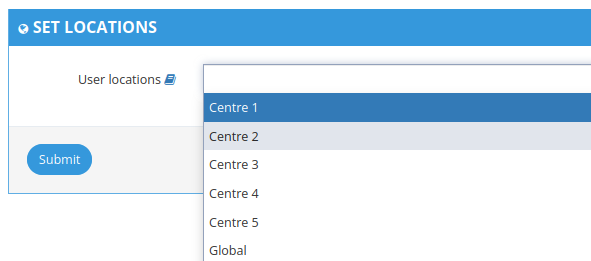
1. In the User Details page (displayed after creating user), select the locations the user should have access to.
2. Multiple locations can be selected for each user, as applicable. User will see information and receive notifications according to the locations the user's associated with.
4. Set User Subscriptions
Read the article Subscription List Management for more information on roles.
Related Articles
How to create a Location
1. How to create a location Go to Locations page (available on the left menu or in Welcome Page). Expand "Add Location" form. 3. Insert Location's details (e.g Code, Name, Type, Country) and click "Add" at the bottom of the form 4. Location will be ...How to edit and delete a location
Note: Check also article How to create a location to learn how to create a location. 1. Edit a location 1. Go to the location's details (see step 1. of How to configure a location for the creation of automatic movements). 2. You can edit any location ...Subscription List Management
1. Subscription Lists To see the subscription lists go to Subscription page. Depending on your account permissions/configuration, the following subscription lists may be available in the system: Subscription List Name Description Unblinded List An ...Automatically generated Tracking Number
1. Rules for the automatically generated Tracking Number 1.1 Tracking number format The automatically generated Tracking number uses the following properties to create the tracking number (TC-LC-SQN): TC: Trial code LC: Destination location code SQN: ...Account Management
1. How to access the account management Users with account management permissions will be able to choose to enter a Trial or an Account. 1. To access the account management, choose the account you want to access and click on Manage Account. 2. You ...