Predictive Shipment
1. What is Predictive Shipment
For trials configured with Scheduled Visits, it is now possible to activate predictive shipment.
Taking into account upcoming subject visits, automatic resupply will consider the number of products needed for future dispenses (within a predefined timeframe).
The Predictive Shipment can be configured to take into account the visits in a given timeframe (in number of days):
- Short Window: the upcoming visits (and required dispenses) within this window will be considered for Resupply Trigger
- Long Window: the upcoming visits (and required dispenses) within this window will be considered for Resupply Target
Example available in section 4.
2. Short Window and Long Window can be edited
The short window and long window can be edited at anytime on Trial Settings page:
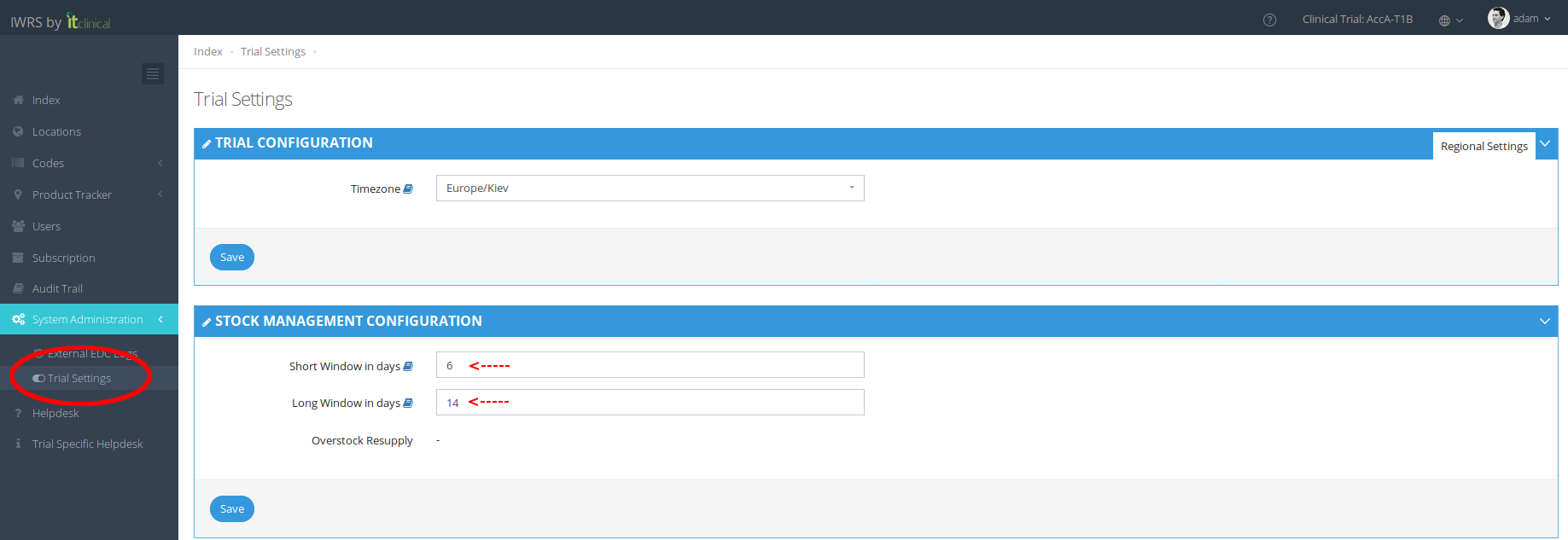
3. Requirements to use Predictive Shipment
Predictive shipment can only be configured for trials that have both the following configurations:
- Automatic shipment initiation
- Scheduled visits
4. Selected products and automatic movements when using predictive shipment
4.1. When are shipments initiated (impact on trigger)?
In order to present this functionality, please refer to the example below.
Short/Long window configuration:
Short window: 7 (days)
Long window: 14 (days)
Supply scheme configuration:
Resupply Trigger: 3
Resupply Target: 6
Current products on site (01): 4 Test + 4 Control
Upcoming visits scheduled for site 01:
| Subject | Visit | Date | Treatment | Amount to dispense | Location |
|---|---|---|---|---|---|
| S-01 | Visit 1 | 2019-06-20 | Control | 1 | 01 |
| S-01 | Visit 2 | 2019-06-28 | Control | 1 | 01 |
When a shipment is initiated using the Predictive Shipment the following will be taken into account:
| Today | Is Visit 1 within short window? | Is Visit 2 within short window? | Number of Products (Control) available at location | Number of available product vs Trigger (3) | Is Shipment Created? |
|---|---|---|---|---|---|
| 2019-06-12 | No (8 days left) | No (16 days left) | 4 | 4> 3 | No |
| 2019-06-13 | Yes (7 days left) | No (15 days left) | 4 - 1 (upcoming visit) = 3 | 3 = 3 | Yes |
| 2019-06-27 | No (visit 1 has a past date) | Yes (1 day left) | 4 - 1 (upcoming visit) = 3 | 3 = 3 | Yes |
| 2019-06-28 | No (visit 1 has a past date) | No (visit 1 has a past date) | 4 | 4> 3 | No |
The trigger will be affected by the upcoming visits within the short window only! Movement will be created if trigger is reached!
4.2. How many products are shipped (impact on target)?
In order to better explain this new functionality, please refer to the example below.
Please consider the configurations of the example above (products at site and upcoming scheduled visits).
When a shipment is initiated using the Predictive Shipment the following will be taken into account:
| Number of Products required at location (Target = 6) | Number of products selected for shipment | ||||||
|---|---|---|---|---|---|---|---|
| Today | Is Shipment Created? | Is Visit 1 within long window? | Is Visit 2 within long window? | Control | Test | Control | Test |
| 2019-06-12 | No | Yes (8 days left) | No (16 days left) | - | - | - | - |
| 2019-06-13 | Yes | Yes (7 days left) | No (15 days left) | 6 (target) + 1 (upcoming visits) - 4 (in location) = 3 | 6 (target) + 0 (upcoming visits) - 4 (in location) = 2 | 3 | 2 |
| 2019-06-27 | Yes | No (visit 1 has a past date) | Yes (1 day left) | 6 (target) + 1 (upcoming visits) - 4 (in location) = 3 | 6 (target) + 0 (upcoming visits) - 4 (in location) = 2 | 3 | 2 |
| 2019-06-28 | No | No (visit 1 has a past date) | No (visit 1 has a past date) | - | - | - | - |
The target will be affected by the long window. All upcoming visits until the long window will be considered! Movement will be created with required number of products!
Related Articles
Trial Settings - Stock Management Configuration
1. How to see the Stock Management configuration Only users with certain permissions can see the stock management configurations. The Stock Management configuration page includes information regarding: Predictive Stock Resupply: Short and Long ...Automatic Shipment Initiation
1. Stock Resupply - Automatic Shipment Initiation Stock resupply is useful if you want shipments to be automatically initiated in order to avoid running out of products. The location needs to have a depot and a supply scheme with a resupply trigger ...Product Shipment Rules
1. Shipments cannot be performed between locations at same level (e.g. between sites or regional distributors) Examples: Same level shipments are not allowed Origin Destination Result Global Regional Success Regional Site Success Global Site Success ...Step 2 - Cancel, Confirm and Edit Shipment
1. Cancel Shipment When in "Waiting" status, shipments can be canceled. If you cancel the shipment, products will be left in the origin location and the Shipment Status will be "Cancelled". 2. Confirm Shipment After initiating a shipment the shipment ...How to configure a location for Automatic Shipment Initiation
1. Steps for the configuration of Automatic Shipment Initiation It is assumed that the trial is configured for automatic shipments. To correctly use this feature, the following steps must be followed: 1. Select a location from the Locations list by ...