Trial Settings - Timezone
1. How to edit trial timezone
Only users with certain permissions can see and/or edit the trial timezone.
1. Go to Trial Settings page under System Administration on the left menu
2. Select Regional Settings tab
3. The trial's timezone will be available as originally configured for the trial
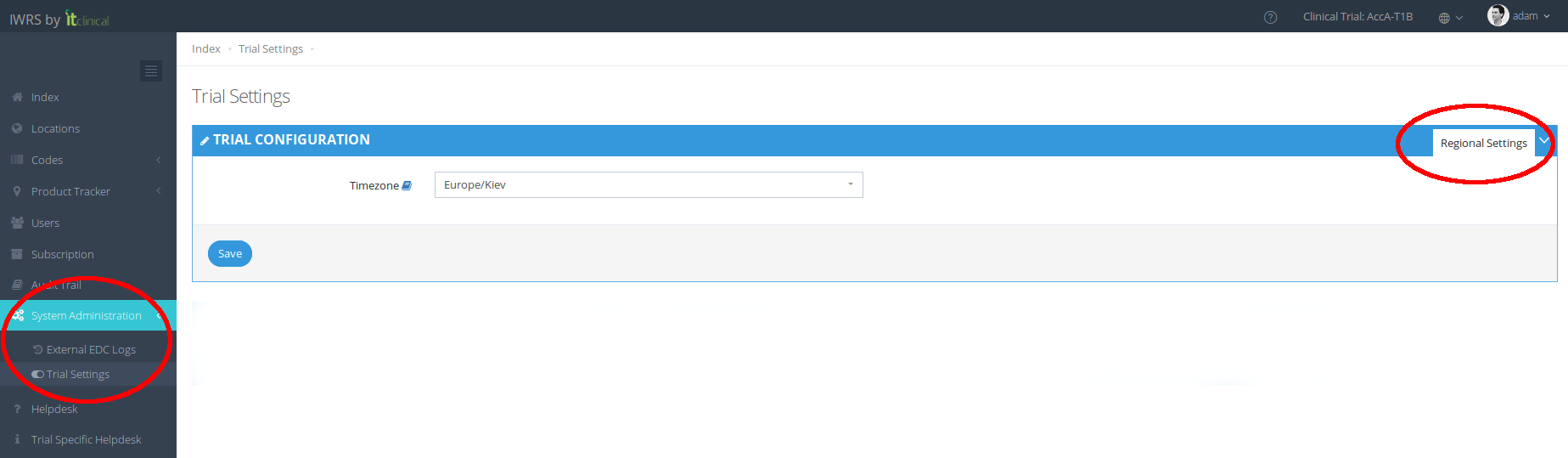
4. To change the trial timezone, select from the list the new timezone
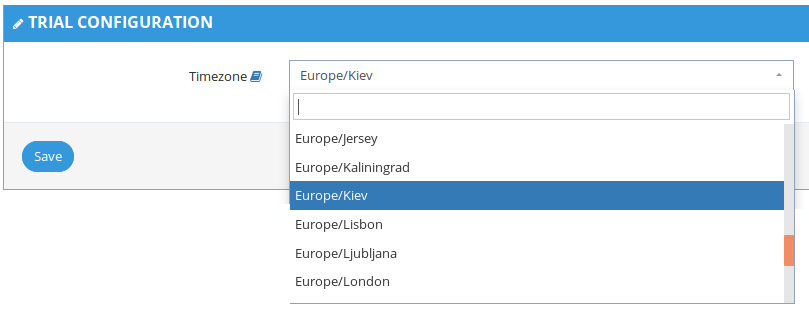
5. The trial will be updated with the new edited timezone.
2. Where will the trial timezone be available?
The timezone will be available in the date fields.
Below is a list of the pages where the the corresponding date/time fields will be updated according to selected timezone.
Page Name | Field |
Code List | Randomisation date and time |
Code Details | Randomisation date and time |
Code Details – Product Dispensing | Dispensing Date |
Code Movement History | Date |
Unblinded Subjects | Date |
Blinded Transfer | Date |
Unblinded Transfer | Date |
Import Products | Date |
User details - Login History | Date |
External EDC Logs | Date |
Audit Trail | Date |
Related Articles
Trial Settings - Visit Configuration
Note: Only users with certain permissions can see and/or edit the visit related configurations. 1. Subject visits schedule configuration Visit scheduling configuration allows the user to configure how many days after randomisation the visits should ...Trial Settings - Stock Management Configuration
1. How to see the Stock Management configuration Only users with certain permissions can see the stock management configurations. The Stock Management configuration page includes information regarding: Predictive Stock Resupply: Short and Long ...Language Settings
Note - Currently the available languages are: English and Chinese. For this section we will do a small walkthrough to explain where and how the user can change its language settings. We will start with the login page in English language and change it ...Trial Details
1. How to edit the trial details Only users with certain permissions can see and/or edit the trial details. 1. Go to Trial Settings page underSystem Administrationon the left menu 2. Select Trial Details tab 3. The trial details will be shown as ...Account or Trial selection
Note: This feature only applies to users associated with more then one account and/or trial. 1. Context Context is what defines the data the user is interacting with when logged in. A context can be a trial or an account. A user can only select ...